
Extensions for Piwigo
Change appearance with themes. Add features with plugins. Extensions require just a few clicks to get installed. 350 extensions available, and growing!

Spotlight

Community
'Community' allows users of your gallery to create albums and add photos - with an option for administrators to moderate submissions.
Highest rated
Community
'Community' allows users of your gallery to create albums and add photos - with an option for administrators to moderate submissions.
Most downloaded
Download formats buttons
Display buttons on picture page to download different formats (if enabled)
Most recent
BatchCustomDerivatives
same as Piwigo 14.4.0 New languages:
Spotlight
Bootstrap Darkroom
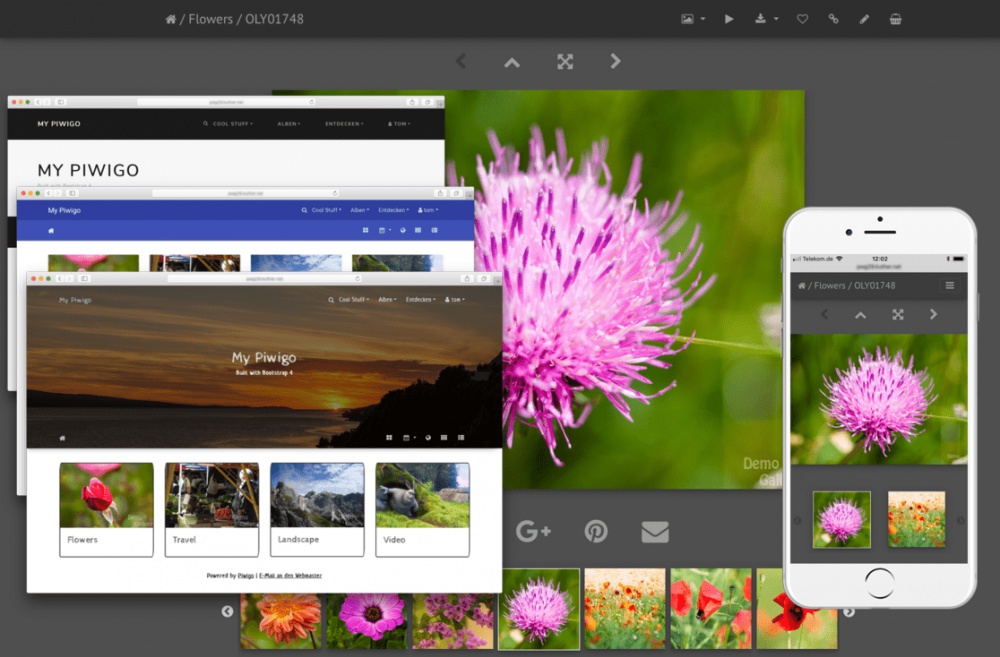
A feature-rich and mobile-ready theme based on Bootstrap 4. Features: * Over 30 color styles -> Bootswatch -> Material Design -> Custom low-contrast dark color scheme based on Lightroom® colors * Full screen slideshow view using PhotoSwipe -> Supports auto play -> Supports HTML5 video -> Album thumbnails can be linked to PhotoSwipe directly (like smartpocket) * 100% mobile ready -> fully responsive Navbars, Carousel, PhotoSwipe slideshow, video content -> async/ondemand loading of carousel & PhotoSwipe content, adaptive image size selection, swipe & tap events * Carousel album navigation on the picture page using Slick slider * Video support using native HTML 5 video widget * Optional hero image or jumbotron banner * Different layouts for infos on picture page * Tons of configuration options Requirements: * PHP >= 5.3 Recommended plugins for best mobile experience: * GThumb+ or gdThumb (for best "available screen space usage") * RV Thumbnail Scroller (to keep initial page load size small and allow for easy "swipe through") Compatible with 'User collections', 'Expiry date' & 'Batch downloader' plugins
Highest rated
Stripped & Columns
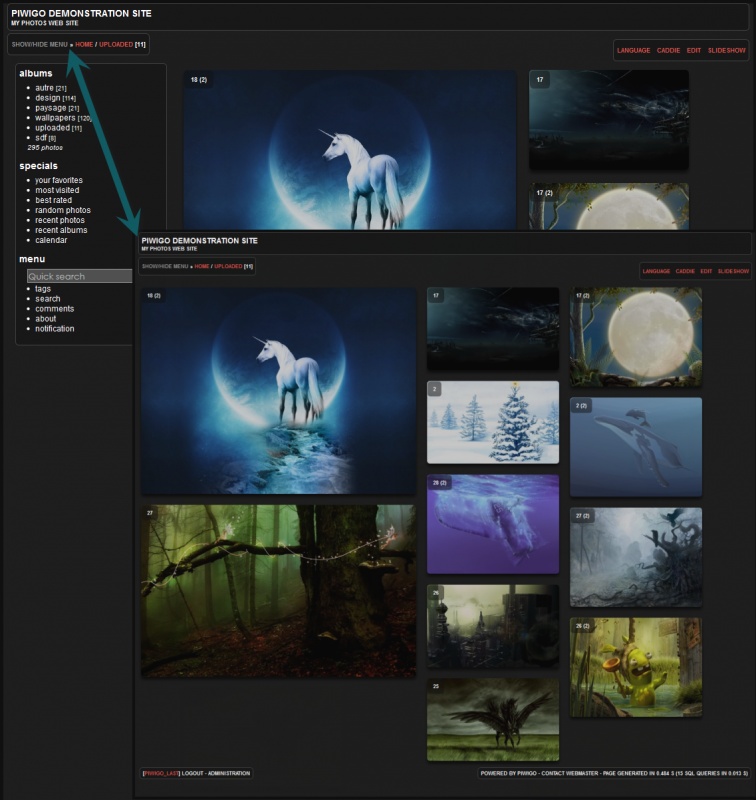
Thème enfant de Stripped, Stripped & Columns permet un affichage totalement innovant des miniatures : grâce au plugin jquery mansonry, les miniatures sont affichées en plusieurs colonnes de taille fixe. Les blocs Pwg stuff sont gérés par le thème, et les miniatures peuvent même être crées par le thème ! La largeur des blocs étant paramétrable, le thème peut générer des miniatures de largeur adéquate sans passer par piwigo ! Comme il s'agit d'un thème enfant de Stripped, on retrouve le menu dynamique disparaissant/apparaissant d'un clic, les icônes remplacées par du texte... Toutes ces options sont à paramétrer dans le thème Stripped Cerise sur le gâteau, les colonnes se réarrangent dynamiquement selon le menu !
Most downloaded
Bootstrap Darkroom
A feature-rich and mobile-ready theme based on Bootstrap 4. Features: * Over 30 color styles -> Bootswatch -> Material Design -> Custom low-contrast dark color scheme based on Lightroom® colors * Full screen slideshow view using PhotoSwipe -> Supports auto play -> Supports HTML5 video -> Album thumbnails can be linked to PhotoSwipe directly (like smartpocket) * 100% mobile ready -> fully responsive Navbars, Carousel, PhotoSwipe slideshow, video content -> async/ondemand loading of carousel & PhotoSwipe content, adaptive image size selection, swipe & tap events * Carousel album navigation on the picture page using Slick slider * Video support using native HTML 5 video widget * Optional hero image or jumbotron banner * Different layouts for infos on picture page * Tons of configuration options Requirements: * PHP >= 5.3 Recommended plugins for best mobile experience: * GThumb+ or gdThumb (for best "available screen space usage") * RV Thumbnail Scroller (to keep initial page load size small and allow for easy "swipe through") Compatible with 'User collections', 'Expiry date' & 'Batch downloader' plugins
Most recent
modus
same as Piwigo 14.4.0 New languages: * Cambodia (ខ្មែរ [KH])
Spotlight

flop_style
Template extensions was a new developer feature introduced in Piwigo 2.x that makes customization easier. Flop_style, as one such extension, allows display modifications in Piwigo. What's in flop_style? 11 tpl files: flop_style/mainpage_categories/captify_mini.tpl flop_style/mainpage_categories/jPolaroid.tpl flop_style/mainpage_categories/medium_cat.tpl flop_style/mainpage_categories/mosaic.tpl flop_style/mainpage_categories/picpile_cat.tpl flop_style/mainpage_categories/polaroid.tpl flop_style/mainpage_categories/popout_details.tpl flop_style/mainpage_categories/spotlight.tpl flop_style/thumbnails/fancy_hover.tpl flop_style/thumbnails/jPolaroid.tpl flop_style/thumbnails/polaroid.tpl How to install? -download the zip, put the folder flop_style and its content in the folder template-extension/ of your gallery -in your administration, go to Configuration->Templates or admin.php?page=extend_for_templates, if you prefer -in Original templates select the name of the sub-folder of the template of flop_style (e.g. for flop_style/thumbnails/polaroid.tpl select thumbnails.tpl) -the 2 others parameters are optional: keep them empty to apply the template to the whole gallery and all themes See the screenshot on this page to have an idea of what is inside!
Highest rated
flop_style
Template extensions was a new developer feature introduced in Piwigo 2.x that makes customization easier. Flop_style, as one such extension, allows display modifications in Piwigo. What's in flop_style? 11 tpl files: flop_style/mainpage_categories/captify_mini.tpl flop_style/mainpage_categories/jPolaroid.tpl flop_style/mainpage_categories/medium_cat.tpl flop_style/mainpage_categories/mosaic.tpl flop_style/mainpage_categories/picpile_cat.tpl flop_style/mainpage_categories/polaroid.tpl flop_style/mainpage_categories/popout_details.tpl flop_style/mainpage_categories/spotlight.tpl flop_style/thumbnails/fancy_hover.tpl flop_style/thumbnails/jPolaroid.tpl flop_style/thumbnails/polaroid.tpl How to install? -download the zip, put the folder flop_style and its content in the folder template-extension/ of your gallery -in your administration, go to Configuration->Templates or admin.php?page=extend_for_templates, if you prefer -in Original templates select the name of the sub-folder of the template of flop_style (e.g. for flop_style/thumbnails/polaroid.tpl select thumbnails.tpl) -the 2 others parameters are optional: keep them empty to apply the template to the whole gallery and all themes See the screenshot on this page to have an idea of what is inside!
Most downloaded
flop_style
Template extensions was a new developer feature introduced in Piwigo 2.x that makes customization easier. Flop_style, as one such extension, allows display modifications in Piwigo. What's in flop_style? 11 tpl files: flop_style/mainpage_categories/captify_mini.tpl flop_style/mainpage_categories/jPolaroid.tpl flop_style/mainpage_categories/medium_cat.tpl flop_style/mainpage_categories/mosaic.tpl flop_style/mainpage_categories/picpile_cat.tpl flop_style/mainpage_categories/polaroid.tpl flop_style/mainpage_categories/popout_details.tpl flop_style/mainpage_categories/spotlight.tpl flop_style/thumbnails/fancy_hover.tpl flop_style/thumbnails/jPolaroid.tpl flop_style/thumbnails/polaroid.tpl How to install? -download the zip, put the folder flop_style and its content in the folder template-extension/ of your gallery -in your administration, go to Configuration->Templates or admin.php?page=extend_for_templates, if you prefer -in Original templates select the name of the sub-folder of the template of flop_style (e.g. for flop_style/thumbnails/polaroid.tpl select thumbnails.tpl) -the 2 others parameters are optional: keep them empty to apply the template to the whole gallery and all themes See the screenshot on this page to have an idea of what is inside!
Most recent
BatchCustomDerivatives
Minor fix so piwigo_deriv.pl ignores image redirects (when derivative is larger than original)