I am attempting to update my Physical Photo Move plug-in, switching from the static categoryList class to the data-selectize option that's used by the Move/Associate actions in Batch Manager, so that the list of albums is nicer and you can type to search.
I am filtering the list of categories to only show physical albums:
function ppm_list_physical_albums()
{
$query = '
SELECT
id,
name,
uppercats,
global_rank
FROM '.CATEGORIES_TABLE. '
WHERE dir IS NOT NULL
;';
$cat_selected = 0;
display_select_cat_wrapper($query, $cat_selected, 'categories', true);
}
In my batch_global.tpl, when I use:
<select data-selectize="categories" name="cat_id" placeholder="{'Select a physical album... or type it!'|@translate}">
{html_options options=$categories selected=$categories_selected}
</select>
I get the proper list of values, but they are apparently being sorted by the value (cat_id) so they are not listed in proper alphabetical order mirroring the folder structure, even though in the resulting generated source code, they are listed in the proper order:
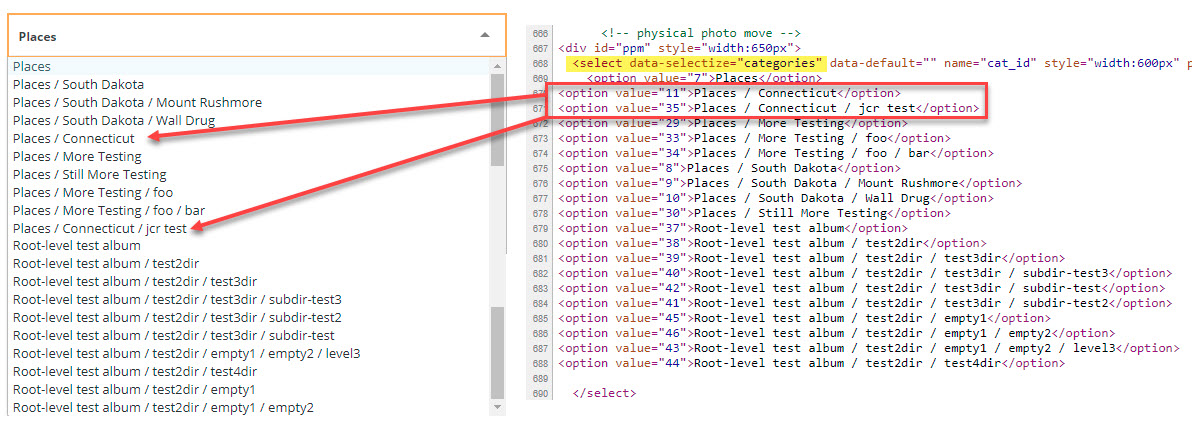
My current plug-in uses categoryList:
<select class="categoryList" name="cat_id" size="10">
{html_options options=$categories selected=$categories_selected}
</select>
So if I try that:
<select data-selectize="categoryList" name="cat_id" placeholder="{'Select a physical album... or type it!'|@translate}">
{html_options options=$categories selected=$categories_selected}
</select>
The categories are properly ordered BUT I can't type in the box to search and for some reason the drop-down appears above the field instead of below it (but that could be some other page rendering thing).
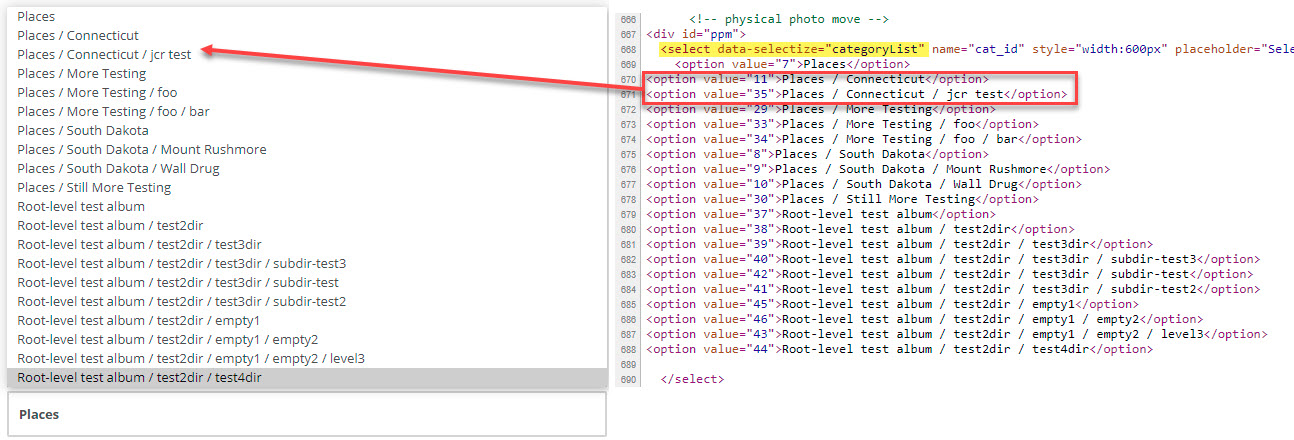
In both cases, the dropdown defaults to selecting the first category in the list (in this example, "Places") instead of being empty with the placeholder text like what you see with Move or Associate. That's a lesser issue but I'd like for the dropdown to start empty so the user can either click to list the categories, or start typing to search.
What am I missing here to get this to work the way I want?

